

How to Use AI Prompts to Generate Reel Ideas and Scripts Before Editing in Alight Motion
Starting a reel with a completely empty timeline can be frustrating. You may know that you want to create something interesting, but you still have no clear idea about the opening line, scenes, text, or overall flow.
That is where AI prompts can help. Instead of opening your editing app and trying to figure everything out while editing, you can plan the idea, script, shots, and visual direction first. This makes the actual editing process much easier and gives you a clearer path to follow.
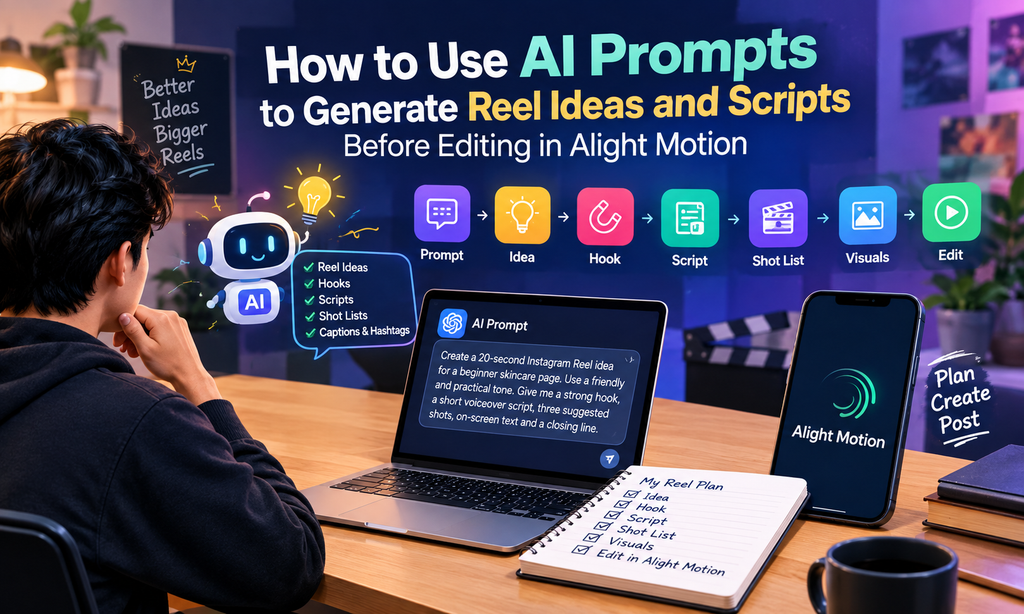
A simple workflow is: prompt → idea → hook → script → shot list → visuals → edit. Once these pieces are ready, you can bring them together in Alight Motion and focus more on making the reel look polished.
Why Plan Before You Open the Editor?
Editing becomes harder when you are making creative decisions at the same time. You might add a clip, remove it, change the text, rewrite the opening, and then realize that the whole sequence needs to be changed again.
Planning helps reduce these unnecessary re-edits. You already know what the reel is about, what the viewer should see, and what message each section needs to deliver.
It also helps with pacing. A short reel cannot spend too much time explaining the topic before getting to the main point. When you plan the script beforehand, you can keep each scene focused.
A strong plan should answer three basic questions:
- What should make someone stop scrolling?
- What information or story should the reel deliver?
- What should the viewer see while the message is being spoken or displayed?
You do not need a complicated production document. Even a short list of scenes and lines can give you enough direction to start editing confidently.
What Can AI Prompts Do for Reels?
AI prompts are useful because you can ask for different parts of the creative process instead of simply asking for a complete reel idea.
For example, you can ask AI to generate:
Reel Ideas
If you work in a specific niche, AI can suggest topics that fit your audience. A fitness creator could ask for beginner workout reel ideas, while a food creator could request short recipe concepts.
Hooks
The first few seconds need to create enough curiosity for someone to continue watching. You can ask for several opening lines and then select one that matches your style.
Scripts
Once you have an idea, an AI prompt can turn it into a short spoken script. You can also specify whether you want an educational, entertaining, conversational, or storytelling tone.
Shot Lists
A shot list tells you what should appear on screen while the script is playing. This is particularly useful when your reel contains multiple clips, text animations, screenshots, or background visuals.
Captions and Hashtags
You can also use AI to create caption ideas and relevant hashtag suggestions after the main content is planned. These should support the reel rather than replace good content.
The important point is that AI should be treated as a planning assistant. You can adjust its suggestions to match your own voice, audience, and editing style.
How to Write a Good Reel Prompt
The quality of the result often depends on how clearly you explain what you want.
A simple formula is:
Niche + platform + length + tone + output format
For example, instead of saying:
Give me a reel idea about skincare.
You could write:
Create a 20-second Instagram Reel idea for a beginner skincare page. Use a friendly and practical tone. Give me a strong hook, a short voiceover script, three suggested shots, on-screen text, and a closing line.
The second prompt gives much more useful information.
Three Copy-Ready Reel Prompts
Prompt 1: Educational Reel
Create a 20-second Instagram Reel for beginners about three common mistakes people make when creating short-form videos. Use a simple conversational tone. Give me a strong opening hook, a voiceover script, three visual shots, on-screen text, and a short closing CTA.
Prompt 2: Product Reel
Create a 15-second Instagram Reel for a small online clothing store. The goal is to highlight one product without sounding too promotional. Give me a curiosity-based hook, short voiceover, scene-by-scene shot list, on-screen text, and a final CTA.
Prompt 3: Storytelling Reel
Create a 30-second storytelling Reel about a beginner who struggled to stay consistent with content creation. Use an emotional but realistic tone. Break the script into five short scenes and suggest what should appear visually in each scene.
If you want ready-made ideas rather than creating every prompt yourself, a resource such as mera prompt can be useful for exploring different prompt concepts and adapting them to your own content.
Weak Prompt vs Strong Prompt
Consider these two examples.
Weak prompt:
Give me a reel about cars.
This leaves too many things undefined. The result could be a review, news video, cinematic edit, educational reel, or something completely different.
Stronger prompt:
Create a 20-second Instagram Reel for car enthusiasts about five visual details that make a parked car look more cinematic. Use a stylish but simple tone. Give me a hook, voiceover, five shots, on-screen text, and a final line.
Now the AI knows the audience, platform, subject, approximate length, style, and required output.
That is the difference between asking for an idea and giving AI enough direction to produce something you can actually use.
A Simple Prompt-to-Edit Workflow
Once your prompt is ready, move through the project in stages.
Step 1: Start With the Idea
Choose one clear topic. Avoid trying to explain five unrelated things in one short reel.
For example:
Topic: How to make phone videos look more cinematic.
Step 2: Create the Hook
Ask for several hooks and choose one that feels natural.
For example:
Your phone camera may not be the problem with your videos.
This creates curiosity without giving away the entire point immediately.
Step 3: Build the Script
Turn the idea into a short voiceover or text-based script. Keep every sentence useful.
For a 20-second reel, the script should remain short enough to fit comfortably within the intended video.
Step 4: Create a Shot List
Break the script into visual sections.
For example:
- Scene 1: Close-up of the phone camera
- Scene 2: Person recording a subject
- Scene 3: Example of framing
- Scene 4: Text showing the main tip
- Scene 5: Final result
Step 5: Prepare the Visuals
Collect your clips, photographs, screenshots, backgrounds, or other visual elements before building the final timeline.
This prevents you from stopping halfway through the edit because you suddenly realize that one scene has no suitable visual.
Step 6: Edit the Reel
Now bring everything into your mobile editing workflow. Because the creative decisions were already made, you can spend more time on timing, text placement, transitions, animation, and overall presentation.
Turning the Script Into an Alight Motion Project
Once your script and shot list are ready, you can organize them inside Alight Motion, a mobile video editing app.
A useful approach is to think of your project as a collection of layers. Your video clips can form the visual foundation, while text, graphics, effects, and audio sit above them where needed.
If you are still learning the interface, this guide on how to use Alight Motion can help you understand the basic editing workflow.
Use Layers to Keep the Timeline Organized
Instead of putting everything together randomly, keep related elements organized.
For example:
- Video clips on the main visual layers
- Voiceover or music on audio tracks
- Main text on separate text layers
- Decorative elements on their own layers
- Additional effects placed where they are actually needed
This makes later adjustments easier.
Animate Text With Keyframes
Keyframes allow you to control how an element changes over time. For example, you can make text move, scale, rotate, or change position between two points on the timeline.
You do not need complicated animation for every word. A simple entrance animation can often make important text more noticeable without distracting from the video.
Sync Visuals With Audio
If your reel uses voiceover or music, pay attention to where important words or beats occur.
A scene change or text appearance can be aligned with an important part of the narration. This makes the reel feel more intentional and connected.
Keep Export Settings Practical
Before exporting, check the video dimensions, frame rate, and quality settings that match your intended platform. Vertical video is generally the natural format for modern short-form platforms.
You should also watch the complete reel once before publishing to catch spelling mistakes, awkward cuts, missing audio, or text that stays on screen for too little time.
Using AI Visual Prompts for Scenes and Backgrounds
AI prompts are not limited to writing. They can also help you plan visual concepts for backgrounds, illustrations, and supporting scenes.
Imagine your reel is about creating cinematic car content. You might need a stylish parked-car scene as a background or visual reference.
Instead of simply asking for “a car photo,” describe the environment and visual mood:
A modern sports car parked in an empty urban parking area at night, cinematic lighting, wet pavement reflections, dramatic perspective, clean composition, realistic photography style, vertical composition.
The more relevant visual details you provide, the easier it becomes to communicate the look you want.
For a scene like this, a mera prompt car parking prompt can give you a ready visual idea that you can adapt to your reel concept.
The generated visual does not have to become the entire reel. It can simply provide a background, inspiration, or supporting visual that works with your other footage.
Common Mistakes to Avoid
1. Writing Vague Prompts
“Give me a viral reel” is too broad. Tell AI the topic, audience, platform, approximate length, tone, and output you need.
2. Copying the Script Word for Word
AI-generated writing can be a useful starting point, but it should not automatically become your final script.
Read it aloud. Remove unnatural sentences, add your own expressions, and make sure the information actually fits your audience.
3. Ignoring the Video Length
A script written for a longer video cannot simply be squeezed into a short reel.
Tell AI the approximate duration from the beginning. Then read the finished script aloud to see whether it comfortably fits your planned format.
4. Adding Too Many Ideas
One short reel usually works better when it has one clear purpose.
If you have several related ideas, turn them into a series instead of forcing everything into one timeline.
FAQ
Can beginners use AI prompts for reel creation?
Yes. Beginners can use prompts to generate ideas, hooks, scripts, and shot lists before opening their editing app. This can make the creative process easier to organize.
Should I let AI write the entire reel?
You can use AI to create a first draft, but it is better to review and personalize the result. Your own experience and voice can make the final reel feel more natural.
How detailed should a reel prompt be?
A useful prompt should normally include the topic, target platform, approximate video length, tone, audience, and the format of the answer you want.
Can AI prompts help with video editing too?
Yes. Prompts can help you plan scenes, text ideas, visual directions, transitions, and shot sequences. The actual editing can then be completed in your preferred mobile editing app.
Conclusion
Creating a reel does not have to begin with an empty timeline. By planning the idea, hook, script, shots, and visuals first, you can enter the editing stage with a much clearer direction.
AI prompts are especially useful when you know your topic but are struggling to turn it into a structured short video. Start with a simple prompt, refine the result, create a practical shot list, and then bring those pieces into Alight Motion.
The goal is not to let AI make every creative decision for you. Use it to remove the blank-page problem, speed up planning, and give yourself a stronger starting point. Your own editing choices, storytelling, and personal style are what turn that plan into a finished reel.